Alerts
AiyrKids Alert Text Messages
Effective date: October 31, 2026
AiyrKids sends text messages and automated calls to people a parent or guardian chooses, so they know when a child's overnight readings cross the parent's settings or a device disconnects.
How someone joins
- A parent or guardian, signed in to the AiyrKids app, adds an alert contact by name and mobile number, and confirms the contact has agreed to receive AiyrKids alerts.
- AiyrKids sends that number one invitation: "AiyrKids: [Parent] has added you as an alert contact for [Child]. Reply YES to receive alerts. Msg & data rates may apply. Reply STOP to opt out, HELP for help."
- Nothing more is sent unless the contact replies YES.
- After YES, the contact gets a confirmation: "AiyrKids: You're signed up for [Child]'s alerts until [date]. Reply STOP to opt out, HELP for help."
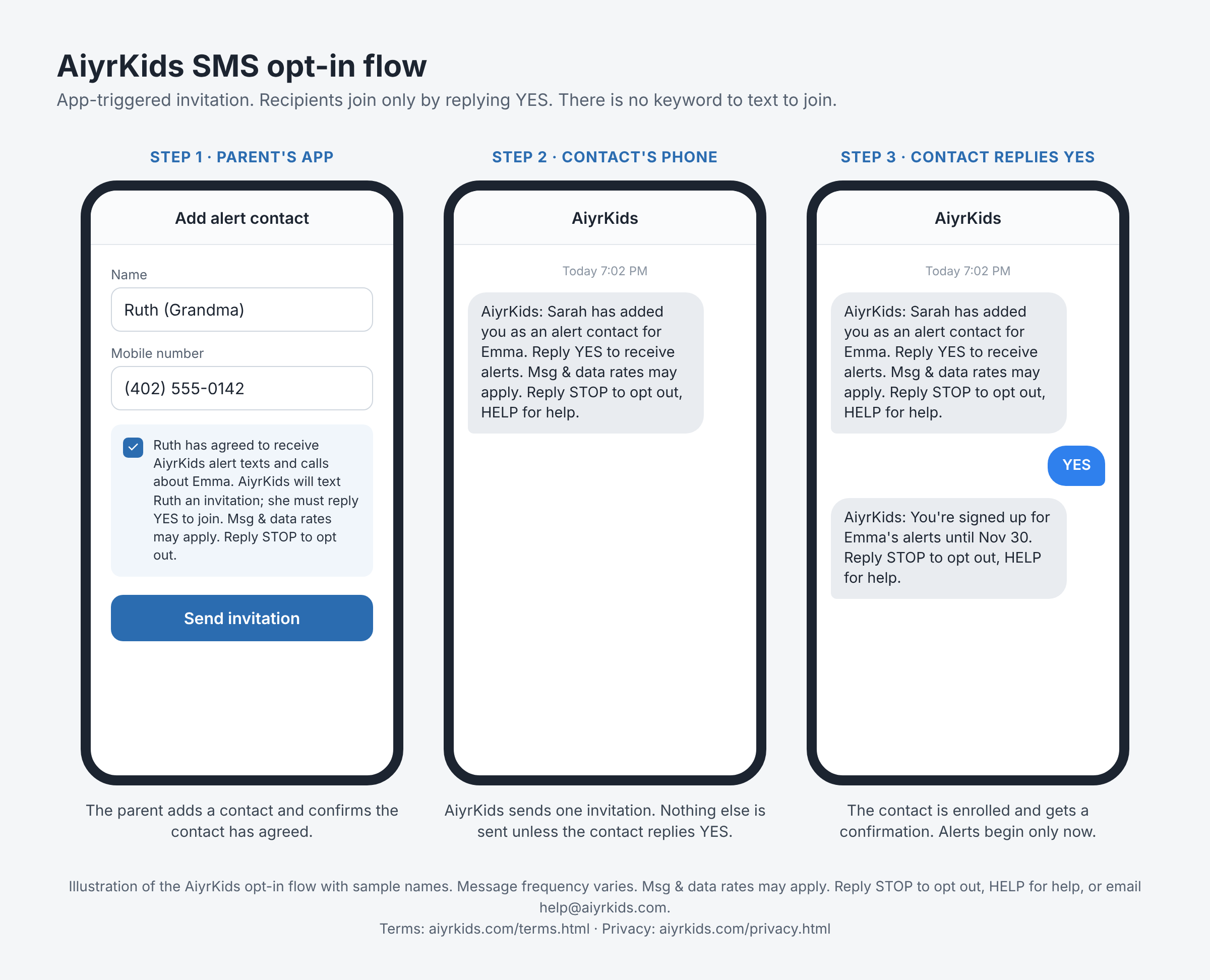
Parents opt in for their own number when they create their account, by checking a consent box with the same disclosure. There is no keyword to text to join.
Message frequency varies with the child's readings and the parent's settings. Message and data rates may apply. Reply STOP at any time to opt out, or HELP for help. Email help@aiyrkids.com. Carriers are not liable for delayed or undelivered messages.
See our Terms of Service and Privacy Policy.